
Screenshots

App details
- Version
- 22.0
- Size
- 2.08 MB
- Updated
- July 15, 2024
- Requires
- Windows 11
- Language
- English
- License
- Free
- Developer
- MigrateEmails
- Category
- Windows OS
SoftPas in:
This product is also available in the following languages:
About MigrateEmails SQL Database Repair Tool
Download MigrateEmails SQL Database Repair Tool – Free, Secure, Windows Data Recovery Software
The MigrateEmails SQL Database Repair Tool is a powerful, free Windows application designed for users facing data corruption or loss in SQL databases. Developed by MigrateEmails, this tool specializes in efficiently repairing damaged or inaccessible SQL Server databases, making it an essential solution for both individuals and small to medium-sized businesses. With a simple interface and robust recovery algorithms, the software enables quick restoration of critical data without requiring advanced technical knowledge. Whether your database has been corrupted due to unexpected shutdowns, hardware failures, or software glitches, MigrateEmails offers a reliable path to recovery. Its focus on performance, security, and ease of use makes it a standout choice among data recovery tools. The tool supports various SQL Server versions and handles both .MDF and .NDF files, ensuring broad compatibility. Best of all, it’s completely free to download and use, making it accessible to users across different industries. For anyone dealing with database integrity issues, this software provides a fast, secure, and effective solution to restore data with minimal downtime.
Effortless SQL Database Recovery with MigrateEmails Tool
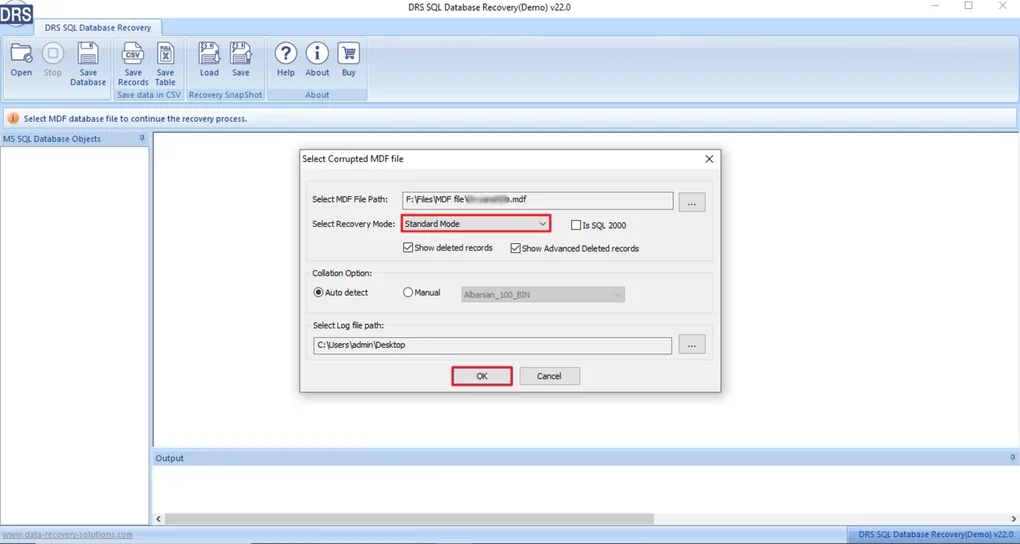
When a SQL database becomes corrupted, the consequences can be severe—lost customer records, interrupted workflows, and financial setbacks. The MigrateEmails SQL Database Repair Tool steps in as a lifeline for users needing to recover data quickly and safely. Unlike complex command-line utilities or expensive enterprise solutions, this tool is built with simplicity in mind. The intuitive interface guides users through the recovery process step by step, making it ideal for non-technical users and IT professionals alike. Upon launching the application, you’re presented with a clean dashboard where you can select the damaged database file (.MDF or .NDF) and initiate the repair process with just a few clicks.
Behind the scenes, the software employs advanced scanning algorithms to analyze the structure of the corrupted database. It identifies and isolates recoverable tables, indexes, and stored procedures, reconstructing them into a new, functional database. The tool preserves data integrity as much as possible, minimizing the risk of further damage during recovery. One of its standout features is the ability to preview recovered data before saving, giving users confidence that their information has been restored accurately. This preview function is particularly useful when dealing with large databases where partial corruption may affect only specific tables. Additionally, the software supports the creation of a new, clean database file in a user-defined location, ensuring no overwriting of the original damaged file. This non-destructive approach enhances security and peace of mind.
Another major advantage is the tool’s lightweight nature. It doesn’t require heavy system resources, so it runs smoothly even on older Windows machines. The entire process—from file selection to final export—can be completed in minutes, depending on the size of the database. Users can also schedule regular checks for database health, although this feature is limited in the free version. Overall, the MigrateEmails SQL Database Repair Tool delivers a seamless experience that balances power and simplicity, making it a top choice for anyone needing a reliable, free solution to repair SQL databases on Windows.
Key Features and Technical Capabilities
The MigrateEmails SQL Database Repair Tool comes packed with a range of features designed to maximize recovery success and user convenience. One of the most valuable features is its support for multiple SQL Server versions, including SQL Server 2000, 2005, 2008, 2012, 2014, 2016, 2017, and 2019. This broad compatibility ensures that users across different environments can benefit from the tool, regardless of their database infrastructure. Whether you're managing a small business database or a departmental system, the tool adapts to your setup without requiring additional configuration.
Another standout feature is the preview capability, which allows users to view recovered data before finalizing the repair. This function helps verify that critical tables and records have been restored correctly, reducing the risk of data loss or errors. The tool also supports the extraction of specific tables, views, and stored procedures, enabling selective recovery when only part of the database is affected. This level of control is invaluable for minimizing downtime and ensuring that only necessary data is restored.
Additional technical highlights include:
- Non-destructive repair process – The original damaged file remains untouched, preserving the possibility of future recovery attempts.
- Support for .MDF and .NDF files – Full compatibility with primary and secondary database files.
- Automatic error detection – Identifies corruption types such as page-level, header, or transaction log issues.
- Export to new database – Creates a clean, functional database file ready for immediate use.
- Fast scanning engine – Optimized algorithms reduce recovery time significantly.
For users concerned about security, the tool does not collect or transmit any personal data during operation. All processing occurs locally on the user’s machine, ensuring privacy and compliance with data protection standards. These features collectively make the MigrateEmails SQL Database Repair Tool a comprehensive, secure, and efficient solution for database recovery.
Installation, Usage, and Compatibility
Getting started with the MigrateEmails SQL Database Repair Tool is straightforward and requires no technical expertise. The software is distributed as a standalone executable file, meaning there’s no need for installation or complex setup. Simply download the installer from the official MigrateEmails website, run the file, and follow the on-screen prompts. The entire process takes less than a minute, and the tool is ready to use immediately after completion.
Once installed, launch the application and navigate to the main interface. Click on “Browse” to locate the corrupted SQL database file (.MDF or .NDF) that needs repair. The tool will automatically begin scanning the file for structural issues. During this phase, users can monitor the progress via a real-time status bar and estimated time remaining. After scanning, the software presents a list of recoverable objects—tables, indexes, views, and stored procedures—each with a preview option.
Users can then choose to recover all data or selectively extract specific components. Once satisfied with the preview, click “Repair” to generate a new, clean database file. You’ll be prompted to choose a destination folder and file name. The repaired database can then be attached to SQL Server using standard management tools, restoring full functionality. The entire workflow is designed to be intuitive, minimizing the chance of user error.
Compatibility is limited to Windows operating systems, including Windows 7, 8, 10, and 11. It does not support Mac, Linux, Android, or iOS platforms. However, for Windows users dealing with SQL Server databases, this restriction is not a major limitation. The tool is optimized for 32-bit and 64-bit systems, ensuring smooth performance across a wide range of hardware configurations. No additional software or drivers are required, making it a truly plug-and-play solution for database recovery.
Pros and Cons: A Balanced View
Like any software, the MigrateEmails SQL Database Repair Tool has its strengths and limitations. Here’s a clear breakdown of what users can expect:
Pros
- Completely free to download and use – No hidden costs or trial limitations.
- Simple, intuitive interface – Easy to navigate even for non-technical users.
- Non-destructive repair process – Original file remains intact for future attempts.
- Supports multiple SQL Server versions – Broad compatibility with common database environments.
- Preview before export – Ensures data accuracy and reduces recovery risks.
- Fast and lightweight – Minimal system resource usage.
Cons
- Windows-only – Not available for Mac, Linux, Android, or iOS.
- Limited advanced features in free version – No automation or scheduling options.
- No cloud integration – Recovery is local only.
- Dependent on file accessibility – If the file is severely damaged, recovery may not be possible.
Frequently Asked Questions (FAQ)
Here are answers to common questions about the MigrateEmails SQL Database Repair Tool:
-
Is the MigrateEmails SQL Database Repair Tool free to use?
Yes, the tool is completely free to download and use without any time or feature restrictions. There are no hidden fees or premium upgrades required for basic recovery functions.
-
Can I recover data from a severely corrupted SQL database?
The tool can recover data from moderately to severely corrupted databases, but success depends on the extent of damage. If the file is completely unreadable, recovery may not be possible.
-
Does the tool work on Windows 11?
Yes, the MigrateEmails SQL Database Repair Tool is fully compatible with Windows 11, as well as Windows 10, 8, and 7.
-
Can I repair both .MDF and .NDF files?
Yes, the tool supports both primary (.MDF) and secondary (.NDF) database files, allowing comprehensive recovery of multi-file databases.
-
Is my data secure during the repair process?
Yes, all data processing occurs locally on your machine. The tool does not collect, store, or transmit any personal or sensitive information.
Conclusion: A Reliable Free Tool for SQL Database Recovery
If you're facing SQL database corruption and need a fast, secure, and free solution, the MigrateEmails SQL Database Repair Tool is an excellent choice. Its user-friendly design, powerful recovery engine, and strong compatibility with major SQL Server versions make it a standout option in the data recovery space. While it’s limited to Windows users and lacks some advanced automation features, its core functionality is robust and dependable.
Whether you're a small business owner, a freelance developer, or an IT administrator, this tool can save you hours of troubleshooting and potential data loss. The ability to preview recovered data before export adds a layer of confidence that’s often missing in similar tools.
Download MigrateEmails SQL Database Repair Tool today and restore your critical data with confidence—free, secure, and hassle-free.
Guides & Tutorials
How to install MigrateEmails SQL Database Repair Tool
- Click the Download button above.
- Once redirected, accept the terms and click Install.
- Wait for the MigrateEmails SQL Database Repair Tool download to finish on your device.
How to use MigrateEmails SQL Database Repair Tool
This software is primarily used for its core features described above. Open the app after installation to explore its capabilities.
User Reviews
No reviews yet. Be the first to share your experience.
You may also like
more
Llama 2
Free-to-use large language model As the new addition to Meta’s arsenal of langua...

NotebookLM
Revolutionizing the note-taking and idea-generation process NotebookLM is an exp...

Github co pilot
AI-inspired software development and coding platform GitHub Copilot is a browser...

Google Gemma
Google’s lightweight AI models Introducing Google Gemma , a family of cutting-ed...

AI Image Enlarger
A free app for Windows, by ai-image-larger. AI Image Enlarger is a free software...

DALL E
AI-driven text-to-image transformation engine DALL·E is a free graphic and desig...